
How Norwalk Arrests Work
Every Norwalk arrest or citation starts with the Norwalk Police Department. Its officers create the local record on the spot. Norwalk counted 91,184 residents in the 2020 Decennial Census profile. That ranks it third in this Fairfield County set. Population says nothing about arrest volume. That figure only explains why Norwalk gets its own municipal record page.
Connecticut abolished county government in 1960. No Fairfield County sheriff, county jail, or countywide roster exists. So a Norwalk police-log entry cannot be traced into a single county inmate database. Local processing, a state transfer, and the court case are three separate stages. A person arrested in Norwalk may be released locally. Others get held by a different authority. Some enter Connecticut Department of Correction custody.
Where Norwalk Arrests Appear
Start with the official Norwalk Police Daily Logs page. It posts arrest, citation, and incident logs, generated automatically each morning around 6 a.m. A separate running adult PDF collects recent adult arrests. Neither works as a jail roster or a booking-photo gallery.
| Channel | What it answers | Photo status | Authority |
|---|---|---|---|
| Norwalk Daily Logs | Local adult arrest, citation, and incident reporting | No photo field observed | Official city source |
| CT DOC search | Current accused or sentenced state custody | Profile may include a DOC image | Official state source |
| Judicial Branch | Case events and disposition | Not a photo gallery | Official court source |
| CT SAVIN/VINE | Qualifying custody or court alerts | No | Official notification service |
| Regional news | Selected stories and context | Sometimes agency-supplied | Selective, secondary |
That morning generation time matters. A late-night Norwalk arrest may not appear until the next automated run. The log promises no instant updates. Weekends and holidays follow no special schedule, so check the printed date before treating an entry as current.
Norwalk Adult Arrest Log Fields
Norwalk titles its adult log “Running Arrest Log - Adult,” a PDF with tidy rows of booking data. Every arrest entry carries an event time and its case details side by side. No public booking-photo column appears in the text you can read. Nor is the log a count of who sits in a cell right now.
| Field | What it may show |
|---|---|
| Arrest details | Date and time, arresting officer, and case number |
| Identity | Name, address, age, race, and sex as recorded |
| Charge | Charge wording and Connecticut statute |
| Next event | Court date and case information |
| Release terms | Bond or fine information when applicable |
Two people can share one name. Match a name with the arrest date, the age, or the case number before you trust a hit. Bond simply sets release terms. The court docket tells the rest of the story. The official Norwalk Daily Logs screen posts each morning's edition for the city.
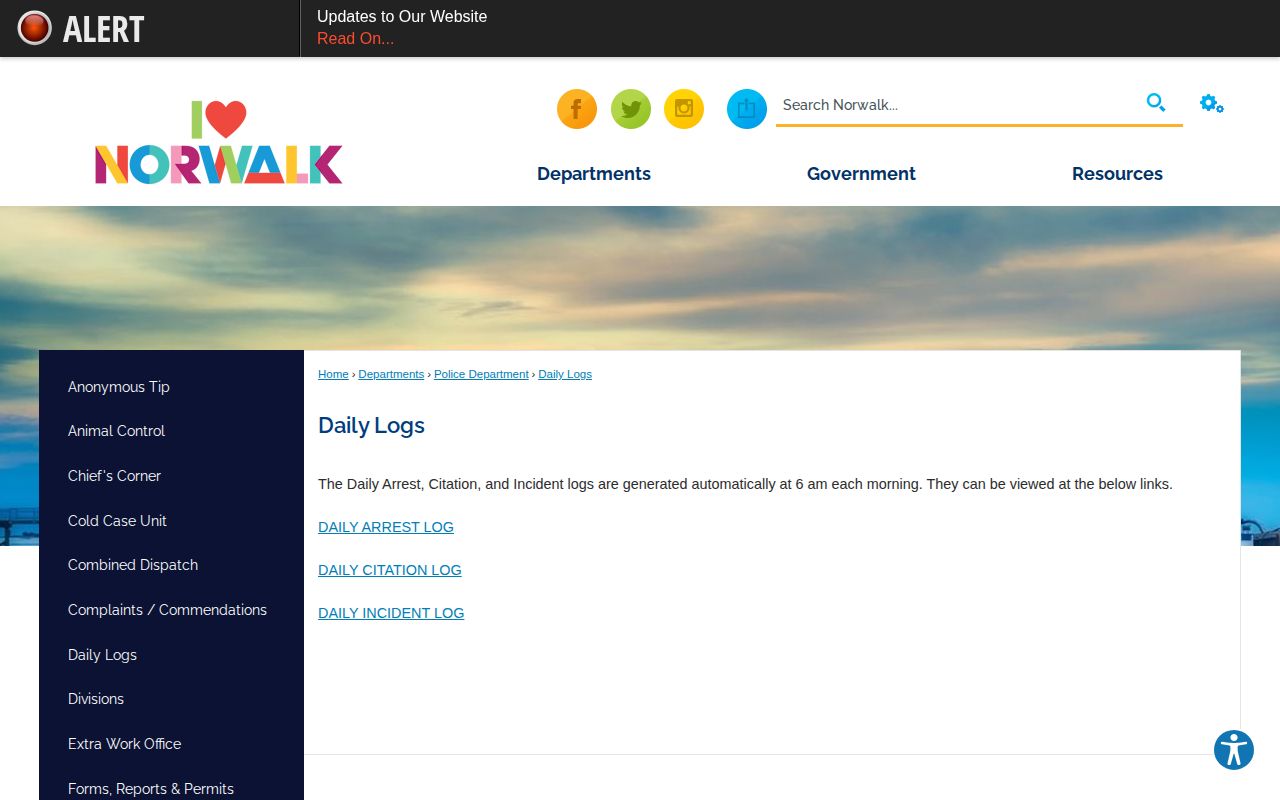
The capture identifies the correct municipal source without displaying a gallery of arrested people.
Find an Arrested Person in Norwalk
Follow the record from the city event outward. Each system answers a different question. Never assume a person missing from one layer was never arrested. A local release, delayed log generation, a transfer, a juvenile restriction, or a record correction can all change what appears on a given day.
- Open the official Daily Logs page and select the running adult arrest log. Confirm the document date and arrest time.
- Match the person with more than a name. Use age, case number, date, or another published field.
- If state custody is possible, search the CT DOC inmate locator by DOC number or the first letters of the last name. A match is a state-custody record, not proof of a Norwalk arrest.
- Use the Connecticut Judicial Branch lookup for the docket, case events, and disposition. Verify key facts with the clerk.
- For a report or photo question, send a focused request to Norwalk Police or use the city’s municipal FOI route.
Tracking release or transfer is different. Connecticut SAVIN/VINE can send qualifying custody notices for that purpose. VINE is not a mugshot search, and a brief local hold may never show up there. Federal custody belongs in the BOP locator. Immigration detention belongs in the ICE locator. Neither system replaces the Norwalk police record.
Norwalk Police Arrest Records
A records request fills the gaps. Norwalk offers a police or municipal FOI route. The department publishes no booking-photo fee, fixed response time, or stated photo policy. Ask for the precise record you need rather than every file about a person.
- Identify the person, date range, and Norwalk event. Add the case number when known.
- Name the requested item, such as the arrest report, booking sheet, or booking photograph if one exists.
- Ask which agency holds the image if Norwalk Police does not. A DOC profile photo is not necessarily the city booking image.
- If any part is withheld, request the legal basis and a releasable redacted copy.
Use the official Norwalk municipal police records channel.
Begin at the Police Daily Logs page
Connecticut General Statutes §1-215 makes core arrest-record information public. The statute still allows lawful redactions. Public status never guarantees a booking photo online. Victim, witness, juvenile, and active-investigation material may all receive different treatment under those exemptions.
The online running log and the official record copy are not retained the same way. Connecticut’s State Library Municipal Records Management Program sets retention schedules by the legal, administrative, fiscal, and historical value of municipal records. Its M7 schedule family covers public-safety and emergency-service material. A log entry that disappears from the public page may still sit in an underlying arrest report, booking sheet, or case record held under the applicable schedule.
For an older Norwalk arrest, narrow the ask. Give the custodian a defined date range. Ask which record series governs the material. If the official copy was lawfully destroyed, the agency can cite the schedule and disposition authority. If it remains in municipal custody, ask a second question. What portion can be inspected or copied? The State Library helps agencies manage retention. It is not a police-record repository and holds no active Norwalk arrest files. Legal erasure is different from ordinary log expiration. A missing PDF entry alone does not prove a case was erased.
Norwalk Arrests After Booking
One Norwalk arrest can leave footprints in three places. The police log records the street-level arrest itself. The Judicial Branch opens a court case on the matter. CT DOC then lists anyone who entered state custody, accused or sentenced. Skip the DOC and you may miss nothing at all: a person released early can appear in the Norwalk arrest log yet never show up in the state locator.
- Booking
- Administrative intake after an arrest.
- Bond
- A release condition that may change by court order.
- Arraignment
- The first court stage addressing charges and release terms.
- Disposition
- The result, which may differ from the booked charge.
Bridgeport Correctional Center holds both pretrial and sentenced offenders. Norwalk is one of the court areas it serves. Even so, it is not a county jail. Nor does every Norwalk arrest end up there. CT DOC answers one narrow question: whether someone is in state custody. The clerk of court answers what happened to the case.
A DOC profile can carry a name, inmate number, birth date, and accused or sentenced status. It may also list current location, primary offense, admission date, release-date fields, a detainer, and a photograph. Note: "can" is doing real work in that sentence. Fields go missing, photos go missing. That gap never proves the government holds no arrest record. Treat the DOC image as a correctional profile photo. It is distinct from any picture taken at the Norwalk police booking itself.
Norwalk Arrest Coverage and News
News coverage helps fill in the story around a notable Norwalk arrest. Connecticut Post and other state outlets sometimes name individuals. Their coverage is selective, though. They print no morning blotter. So they are not custody databases. Police or court records remain the way to verify who is actually in custody.
RecentlyBooked runs a Fairfield County page that may carry a Norwalk item. The site is unofficial, keeps its city coverage quiet, and describes its image sources inconsistently. Mugshots.com, Busted Newspaper, Arrests.org, and Mugshots.zone list no confirmed Connecticut section. A missing commercial result says nothing about a Norwalk arrest.
Start with the official path. Norwalk Police owns the arrest event, and CT DOC owns state custody. CT SAVIN/VINE handles alerts, and the Judicial Branch holds the case file. A news item or commercial listing can still help. Use it for a tricky spelling or a date. It can also be stale, duplicated, or flat wrong. The court file settles it. Connecticut municipal retention schedules may keep older police material alive even after an online log changes. So ask the creating agency whether the official record still exists.
For a same-day approach across the region, the site's Arrests Last 24 Hours discussion takes a wider view. It explains why a city arrest log and a custody check answer different questions. For Norwalk itself, the Daily Logs stay the authoritative publication channel for recent arrests.
Public Record Search
Sponsored Results